Virtual staging for real estate agencies and agents
Virtual staging digitally furnishes or restyles the rooms in your property photos, so buyers can picture the space. It changes only the photo: the real property stays exactly as it is, and a staged image should be labelled as virtual and shown next to the real photo.
Start with VibePeakWhat VibePeak does for your listing photos
The Property Photo Editor in the VibePeak web app is where you stage and edit listing photos.
Restyle a room in 14 interior styles
Scandinavian, Minimalist, Traditional, Mid-Century Modern, Industrial, Mediterranean, Modern, Bohemian, Mountain Rustic, Luxury, Japandi, Wabi-Sabi, Organic Modern and Quiet Luxury. It works on empty or furnished rooms and keeps the walls, windows and doors.
Empty a room in one click
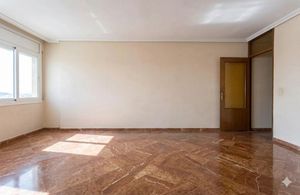
Removes all the furniture and decor from the photo, so you can show the bare space.
Edit a photo in plain language
Describe the change you want in your own words. Plain-language edits work on one image at a time.
Enhance light and color
One click adjusts exposure, white balance, contrast and sharpness.
Replace the sky
Swaps the sky in an exterior photo for a clear blue one.
Blur faces, license plates and screens
A privacy blur covers faces, license plates, screens and documents that appear in a photo.
Work on up to 20 photos at once
Batch up to 20 photos, compare each one with its original on a before and after slider, and download a single image or a ZIP.
In the listing video wizard
Separately, when you build a listing video, the wizard can restyle rooms in the same 14 styles and add people to the scene before the photos are animated into the video. This is a different tool from the Property Photo Editor.
Before and after
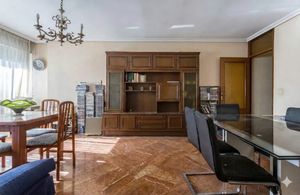
Each pair shows the original photo next to the AI-edited image. The edited images are AI-generated; they are not photographs of the real property.
Emptying a room
Original photo
AI-edited image
Replacing the sky
Original photo

AI-edited image

Enhancing light and color
Original photo
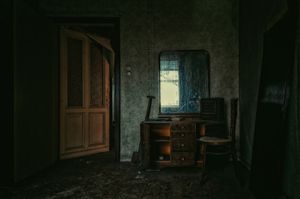
AI-edited image

Label staged photos and show the real one
- Say in the listing that an image is virtually staged, and show the real photo of the room next to it.
- Downloads from VibePeak carry C2PA content credentials that identify them as AI-generated. A visible notice is available as an option; it is not added to every image automatically.
- AI can get details wrong. Check each staged image against the real room before you publish it.
From 2 August 2026 the EU AI Act requires AI-edited listing photos to be clearly labelled — see our AI-content guide.
What the data says about staging
These figures are about home staging in general, from the sources shown. They are not VibePeak results.
In the US, 83% of buyers’ agents say staging makes it easier for buyers to picture a property as their future home
In the US, 49% of sellers’ agents say staging reduced the time a home spends on the market
In the US, 29% of agents report that staging raised the amount buyers offered
In the US, traditional staging with a staging service costs a median of $1,500
Frequently asked questions
What is virtual staging?
Virtual staging uses software to add furniture and decor to a photo of a room, or to restyle the furniture already there. It changes only the photo. The real property is not changed.
What is the difference between virtual staging and physical home staging?
Physical home staging puts real furniture in the property. Virtual staging edits the photo instead, so nothing is moved into the property and the buyer visiting it sees the real rooms.
Do I have to label virtually staged photos?
You should say that a staged image is virtual and show the real photo next to it. VibePeak downloads carry C2PA content credentials that identify them as AI-generated, and a visible notice is available as an option. From 2 August 2026 the EU AI Act requires AI-edited listing photos to be clearly labelled. Our AI-content guide has the details.
How do staged photos end up in a listing video?
The listing video wizard restyles rooms and can add people as part of creating a video. The Property Photo Editor is a separate tool for photos that you download and publish.
Can I stage a room that already has furniture?
Yes. You can restyle a furnished room in one of 14 interior styles, or empty a room in one click.
How much does virtual staging with VibePeak cost?
Plans are shown in the app before you pay. Editing photos in the Property Photo Editor uses no credits. A standard download of an edited image uses credits on monthly plans and is unlimited on yearly plans. Payments are refunded on request within the first 3 days.
Who is virtual staging with VibePeak for?
It is built for real estate agencies and agents, including realtors, and for groups and franchise networks that prepare photos for many listings.
Plans and what is included
Plans are shown in the app before you pay. The link below explains what each plan includes.